Task #103
openTest Parameter Management & Dynamic Result Entry (Select2 Based)
0%
Description
Test Parameter Management & Dynamic Result Entry (Select2 Based)
🎯 Task Objective:
Develop a complete system to:
Create and manage test parameters
Store parameter configuration in database
Dynamically generate result entry UI based on parameter type
Integrate Select2 for selectable fields
Save result values correctly
Navigation: Login > sidebar > Test > Add parameters
PART 1 — BACKEND IMPLEMENTATION
✅ 1. Database Table (test_parameter)
Use table: test_parameter
Columns:
id (PK)
enterprise_id (FK)
test_id (FK)
parameter_id (VARCHAR)
parameter_name (VARCHAR)
parameter_type (VARCHAR)
parameter_values (JSON, nullable)
added_date (DATE_TIME , auto)
Task 1.2 — Enforce Parameter Type Values
Allowed only:
INTEGER
VARCHAR
DOUBLE
SELECT
CHECKBOX
OPTION
✅ 3. Parameter Creation API
Endpoint
POST /api/test-parameters/
Request Payload
{
"test_id": 1,
"parameter_id": "HB",
"parameter_name": "Hemoglobin",
"parameter_type": "SELECT",
"options": ["Low","Normal","High"]
}
Backend Logic:
✔ Read enterprise_id from session
✔ Validate required fields
✔ If parameter_type is selectable → convert options to JSON
✔ Save record
✔ Prevent duplicate parameter_id per test
✅ 4. Get Parameters for Test API
Endpoint
GET /api/test/{test_id}/parameters/
Response Example
[
{
"parameter_id":"HB",
"parameter_name":"Hemoglobin",
"parameter_type":"DOUBLE",
"parameter_values": null
},
{
"parameter_id":"COLOR",
"parameter_name":"Colour",
"parameter_type":"SELECT",
"parameter_values":["Yellow","Red","Brown"]
}
]
Used by result entry screen.
✅ 5. Result Save API
Endpoint
POST /api/test-results/
Payload Example
{
"registration_id":101,
"test_id":1,
"results":[
{"parameter_id":"HB","value":13.5},
{"parameter_id":"COLOR","value":"Yellow"},
{"parameter_id":"SYMPTOMS","value":["Fever","Cough"]}
]
}
Backend Processing
✔ Validate parameter exists
✔ Validate value format by type
✔ Store value (text or JSON)
✔ Save enterprise_id
✅ 6. Validation Rules (Backend)
VARCHAR: Text
INTEGER: Only whole number allowed
DOUBLE: Numeric decimal allowed
SELECT / OPTION: Value must exist in options list
CHECKBOX: All values must exist in options
🎨 PART 2 — FRONTEND IMPLEMENTATION (Refer Attachments)
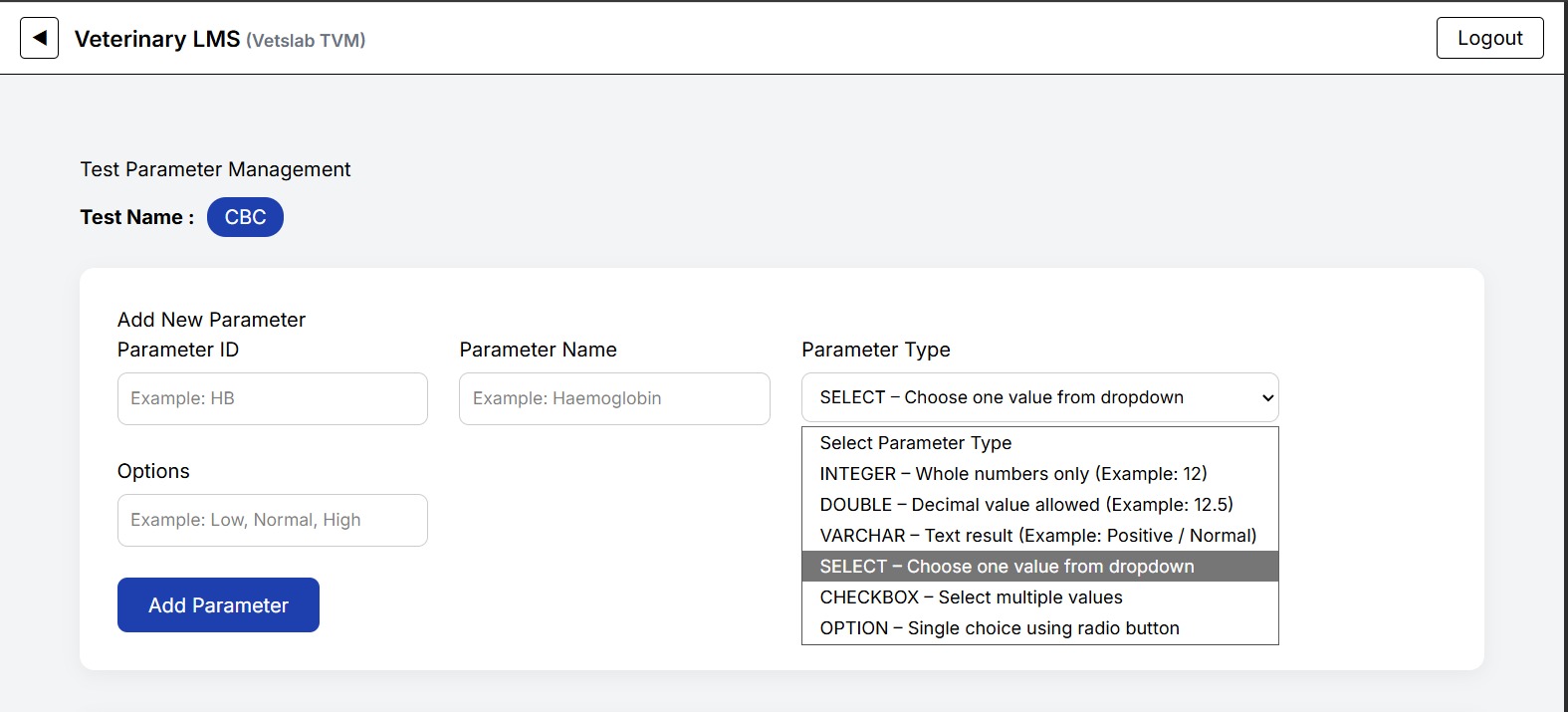
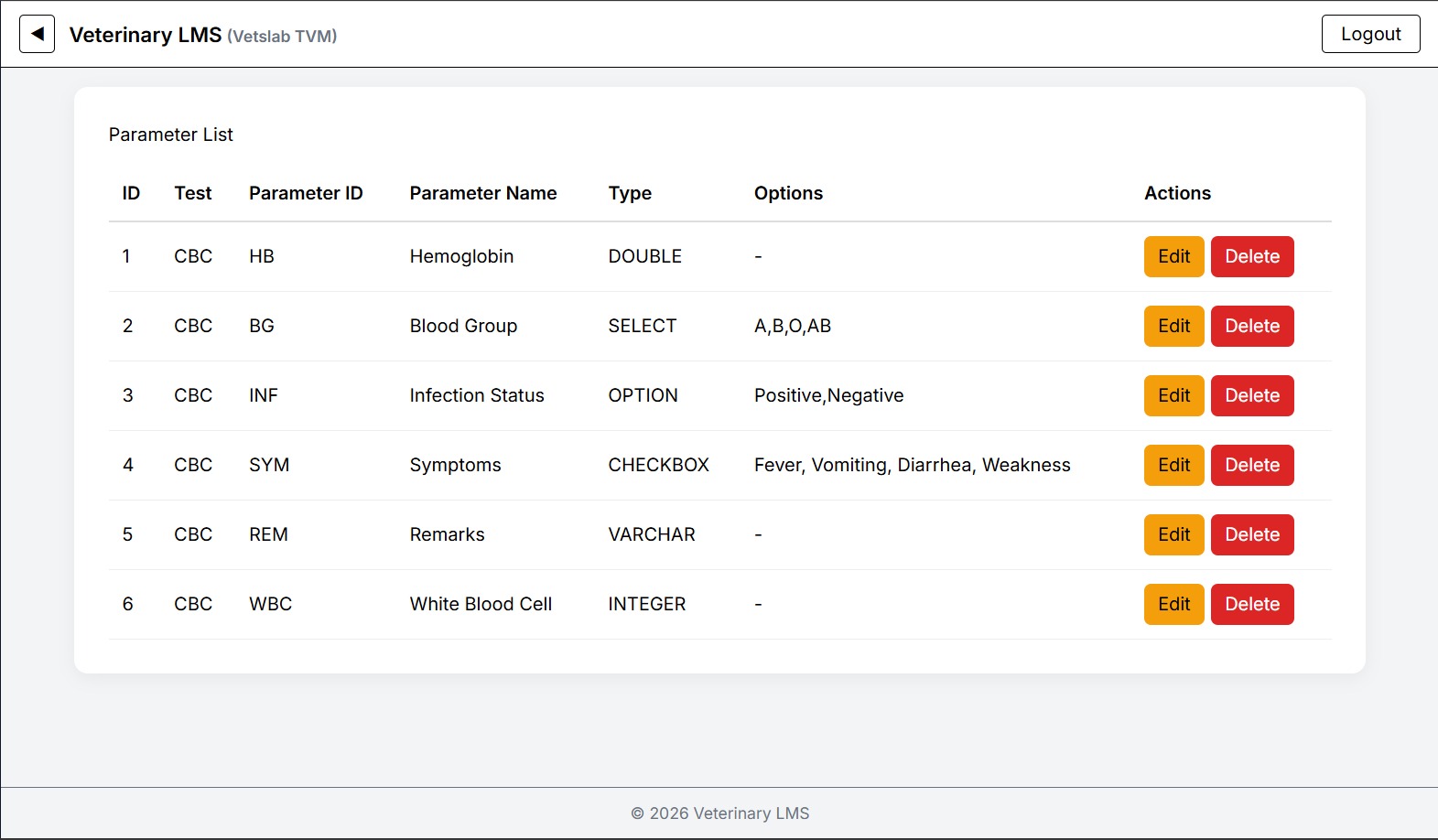
✅ 1. Parameter Creation Screen
Fields:
ID
Test
Parameter ID
Parameter Name
Parameter Type (with description)
Options (backend column name is parameter_values)
Action
-Edit
-Delete
Conditional UI
If type is:
SELECT
CHECKBOX
OPTION
Show:
Options input field
Comma separated entry.
✅ 2. Result Entry Screen
When user selects a test:
Frontend must:
✔ Call parameter API
✔ Render form dynamically
✅ 3. UI Rendering Rules
Type UI Component
INTEGER number input
VARCHAR text input
DOUBLE decimal input
SELECT Select2 dropdown
CHECKBOX Select2 multiple
OPTION radio buttons
✅ 4. Select2 Integration
✅ 5. Result Submission
Collect all values → build payload → call save API.
🔄 PART 3 — FRONTEND + BACKEND FLOW
Admin creates parameter
Stored in database
User selects test
Frontend loads parameters
UI renders dynamically
User enters values
Data sent to backend
Backend validates and saves
✅ PART 4 — COMPLETION CRITERIA
✔ Parameter CRUD works
✔ Dynamic UI rendering works
✔ Select2 working properly
✔ Result saving working
✔ Validations working
✔ Enterprise filtering working
Files