Task #108
openTest Results (Based on Selected Tests in Registration)
0%
Description
MODULE: Test Results (Based on Selected Tests in Registration)
Navigation: Login → Sidebar → Test Results
🎯 TASK OBJECTIVE:
Develop Test Results module where:
• User searches a registration
• System automatically loads the tests selected during registration
• Parameters are fetched based on selected tests
• Result entry is dynamic
• Results saved per parameter
• No manual test selection in this module
🧠 IMPORTANT LOGIC CHANGE
In registration table:
lab_test (JSON)
Example:
[1, 3]
Means:
• Test ID 1 (CBC)
• Test ID 3 (LFT)
So Test Results page must:
1. Read lab_test
2. Fetch parameters for each test
3. Render grouped result sections
PART 1 — FRONTEND IMPLEMENTATION
✅ 1. Sidebar Menu
Add menu: Test Results
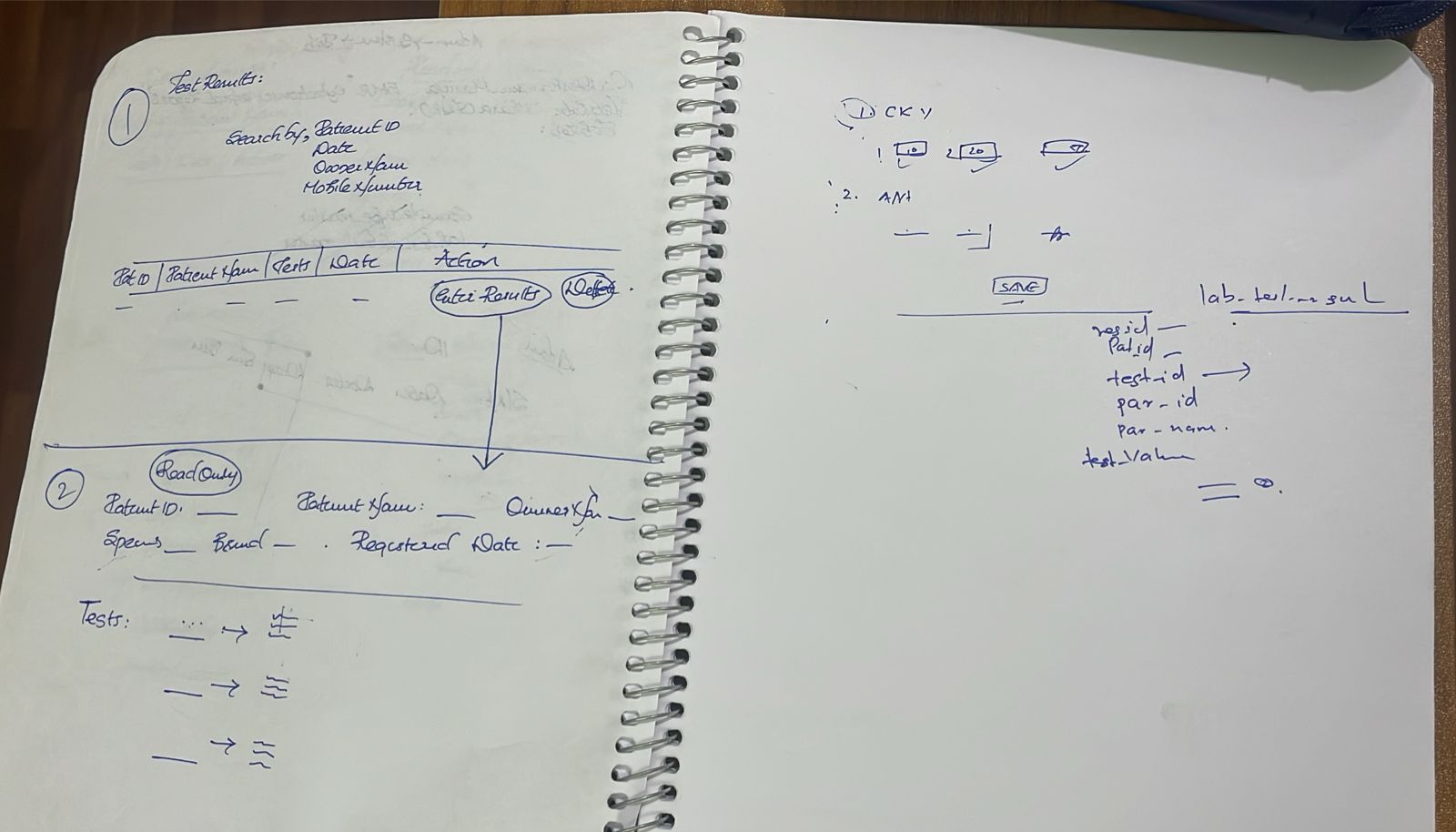
✅ 2. Search Registration Section
Search by:
• Patient ID
• Date
• Owner Name
• Mobile number
Display listing:
| Patient ID | Patient Name | Tests | Date | Action |
Action:
Enter Results
✅ 3. After Clicking “Enter Results”
Show patient details (Read Only):
• Patient ID
• Patient Name
• Owner Name
• Species
• Breed
• Registration Date
✅ 4. Load Selected Tests Automatically
From registration:
lab_test = [1, 3]
System must:
• Loop through each test_id
• Fetch test name
• Fetch parameters for each test
✅ 5. Dynamic Result Entry UI
Results must be grouped by Test.
Example UI:
🔹 CBC
Parameter Input
HB [ Decimal Input ]
WBC [ Number Input ]
COLOR [ Dropdown ]
🔹 LFT
Parameter Input
SGPT [ Decimal Input ]
Bilirubin [ Decimal Input ]
🎨 Rendering Rules
Parameter Type UI
INTEGER Number input
DOUBLE Decimal input
VARCHAR Text input
SELECT Dropdown
CHECKBOX Multi select
OPTION Radio button
✅ 6. Save Button
On click:
• Collect results for all tests
• Send structured payload
⚙ PART 2 — BACKEND IMPLEMENTATION
✅ 1. Table: lab_test_result
id PK
patient_id FK
enterprise_id FK
registration_id FK
test_id FK
parameter_id FK
parameter_name FK
test_value TEXT
added_date DATE-TIME
✅ 2. API — Get Registration
GET /api/registration/{id}
Return:
• Registration details
• lab_test JSON
✅ 3. API — Get Parameters for Multiple Tests
GET /api/tests/{registration_id}/parameters/
Backend Logic:
• Read registration.lab_test
• Fetch all parameters for those tests
• Return grouped response
Example response:
{
"tests": [
{
"test_id": 1,
"test_name": "CBC",
"parameters": [...]
},
{
"test_id": 3,
"test_name": "LFT",
"parameters": [...]
}
]
}
⸻
✅ 4. Save Results API
POST /api/test-results/
Payload Example:
{
"registration_id": 101,
"results": [
{
"test_id": 1,
"parameter_id": "HB",
"value": 13.5
},
{
"test_id": 3,
"parameter_id": "SGPT",
"value": 45
}
]
}
Backend Processing
✔ Validate registration exists
✔ Validate test belongs to registration
✔ Validate parameter belongs to test
✔ Validate value type
✔ Store enterprise_id
⸻
🔐 VALIDATION RULES
Same as Parameter module:
Type Rule
INTEGER Whole number only
DOUBLE Decimal allowed
VARCHAR Text
SELECT Must match one option
CHECKBOX All values must match options
OPTION Only one allowed
🔄 SYSTEM FLOW
Registration created
→ Tests selected and stored in lab_test
→ User opens Test Results
→ Select registration
→ System loads tests automatically
→ Render dynamic parameter UI
→ Save results
✅ COMPLETION CRITERIA
✔ No manual test selection
✔ Multiple tests handled
✔ Dynamic UI grouped by test
✔ Validation enforced
✔ Results saved correctly
✔ Enterprise filtering working
Files
Updated by Sreemayi C M 7 months ago
- Status changed from In Progress to Resolved